In-game commands

All in-game commands of the server are listed below. Type them in chat.
Command | What it does |
.checkstats | Shows the stats, skills and equipped gear of the selected player. The service costs 10 Donate Coin; the target is notified about the check. |
.enchant | Automatic equipment enchanting. Just stock up on scrolls - the process takes seconds. |
.open | Instantly opens every chest in your inventory and shows a detailed report: how many chests of each type were opened and everything that dropped. |
.rb | Status of all Raid Bosses: alive ones first, then sorted by the closest respawn. Click a name to teleport to the boss. Invitations for each RB are configured here as well. |
.records | ECLIPSION RECORDS - global and daily achievements. |
.insane | Live TOP PvP and TOP Farmer statistics while the INSANE FARM zone is active. |
.inst | Availability and cooldowns of the Instance zones. |
.ls | Information about Life Stone skills. |
.cm | Class Master - manage your sub-classes remotely. Available in peace zones and on the Eclipse Territory for its owners while the siege is inactive. |
.fp | Free Party - lets any party member invite, not only the Party Leader. Can be turned off by the Party Leader. |
.tradelock / .tl | TradeLock protection settings. |
.fps | Forced Cache/FPS cleanup (SoftCleanse). |
.relog | Quick relog: you stay in your party and in exactly the same state as before. |
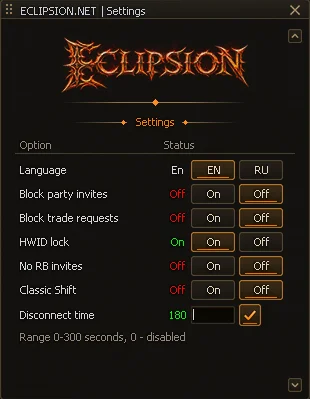
.cfg | Character settings: auto-disconnect timer, shot animation and more. |
.vip | Information about your VIP status. |
.pvprank | Information about your character PvP rank. |
.ss | Fully enable or disable shot animation. |
.market / .mk | Opens the Eclipsion Market - the server trading platform. Available anywhere on the map. |
.gs / .gearscore | Opens the GearScore window - your character power in points. |
.1x1 | Opens Eclipsion Arena - 1x1 fights with stakes, GS matchmaking, the tournament and watching fights. |
.offstat | Statistics of the last offline auto-farm session: time on farm, reason it stopped, mobs killed, deaths and the full drop. |
.cfg window - settings