Quality of life

A set of small but noticeable conveniences that save time and nerves.
Second window and item transfers
If both characters are launched from the same computer, party and trade auto-accept is active. Walk up to your second character, send a party or trade request, hand over the items and press "Yes" - no more switching to the second window just to accept something.
Return after a Raid Boss
After killing an RB you get a teleport invitation back to the exact spot you left from. You no longer have to give up a good farming spot for a Raid Boss.
Upcoming event notifications
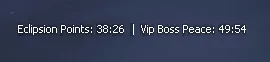
The top-right corner, next to the radar, shows the two nearest events with a countdown - for example "TvT: 03:52 | Weapon Boss: 05:21". It covers Raid Bosses, TvT, Siege of Eclipse, Eclipsion Points, scheduled restarts and more.
Dyes from the inventory
Clicking a dye in your inventory opens the dye install and removal dialog. No need to run to the Tattoo NPC - you can change dyes anywhere, any time.
SoftCleanse and SoftPaste
.fps - forced Cache/FPS cleanup. With Auto Farm on, the cleanup runs automatically every 5 minutes, so long black-screen teleports after extended farming are gone.
SoftPaste - full clipboard support right in the game: CTRL+C, CTRL+V, CTRL+X, CTRL+A.
Free Party
The .fp command lets any party member invite, not only the Party Leader. The Party Leader can turn it off at any moment.
Other
.relog - a quick relog if your FPS is choking: you stay in your party and in exactly the same state.
The default Auto-Disconnect timer is 300 seconds, which prevents dropping out of TvT, INSANE FARM and other locations after a sudden crash. Change it in .cfg.
Toggle skills (Arcane Power, Vicious Stance, Fist Fury and similar) no longer switch off when your character dies.
Trade range increased from 185 to 300. The party invitation delay is gone - you can invite a new player even if the previous one has not answered yet.
Shot animation can be fully enabled or disabled with .ss or in .cfg.
All donate coupons, Premium Account and Hero status are used straight from the inventory - you are taken directly to the right purchase or activation screen. Premium Account and Hero status can be extended.
Every created character is guaranteed Noblesse status.
You can expel players from the clan even while they are in combat.
SoftFade
A smooth animation system: the screen fades in gently after a teleport (Classic-like), and while you use the Community Board (ALT+B) the brightness dims smoothly so your attention stays on the open page.
Quick access [QuickUse]
Every item with the [QuickUse] prefix can be used straight from the inventory to jump to the matching section.
Party highlight
Set up in the party bar by clicking the gear: highlight the whole party or only the roles you need (tank, healer, buffer, mage and others) and pick the highlight color.
Party request (ALT+C)
ALT+C has a new action "Party Request": one click posts your party request to the open chat channel, and other players invite you with one click on the message. The channel (Shout, Hero chat and others) is chosen with the right mouse button. If you are already in a party, the request is not sent.
Buffs and debuffs
Shift+LMB on a buff moves it to the debuff row and back. Debuffs show their remaining time in seconds.
Soulshots
The new Soulshot / Spiritshot animation does not cover your skill animations and does not drop FPS. Soulshots are turned on automatically when you enter the game.
Party kick
You can remove a party member even when they are far away from you, without typing /dismiss.
Hero aura

Heroes have a new aura in the ECLIPSION_VISION interface style.
Upcoming events overlay next to the radar